
Are You Overlooking These Critical CNC Turning Errors In 2026
10 Mistakes You’re Making with CNC Turning in 2026
CNC turning has changed quickly over the years. By 2026, people expect much better accuracy, quicker work, and steadier results. But even skilled workers can stick to old ways that waste time, money, and good output. This piece looks at the usual slip-ups that experts make with CNC turning machines. It also shows how to fix them before they hurt your factory line. I’ve seen shops lose whole shifts because of small oversights like these. It’s frustrating, but fixing them early pays off big.
Are You Ignoring Tool Wear?
Tool wear stays as one of the biggest overlooked issues in CNC turning. Even with smart sensors and watching tools closely, lots of workers keep using tools past their best days. When tools get dull, the surface on parts gets rough. Sizes go off track. Shaking picks up too. A quick look with your eyes isn’t good enough these days. New setups need facts to track how tools are doing.
In busy making spots, skipping wear checks can cause tiny cracks in the cutting bits. These cracks hide until they break a part. You can set up auto warnings for tool life. Base them on the main shaft load or how long you’ve cut. This small move stops big stops in work.
How Tool Wear Affects Precision
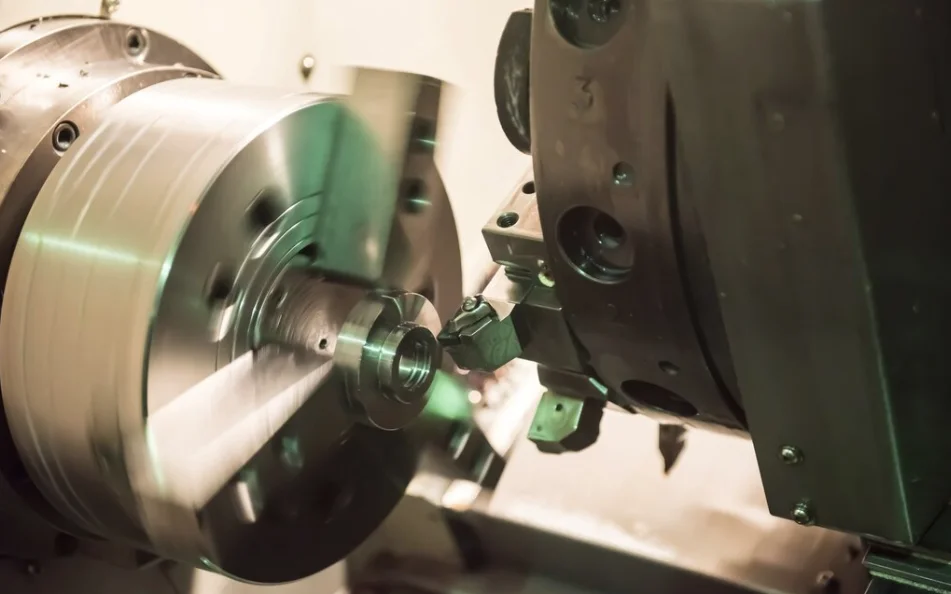
Once the cutting edges get blunt, the push needed to cut goes up. Heat builds up fast then. It changes how the material acts right in the middle of the job. Take titanium as an example. If you machine it when it’s too hot, its hardness shifts across the piece. So, the parts might measure okay at first. But they fail when tested for strength later. In my experience from a shop in Ohio, we once had a batch of titanium rods that looked fine but cracked under load. It cost us a week’s rework—lesson learned the hard way.
Are You Using Incorrect Cutting Parameters?
Wrong feed speeds or turning rates are old problems that cause bad surfaces and broken tools. Plenty of workers still use old lists instead of live changing controls in 2026’s CNC programs.
Pick settings without thinking about the material or how coolant flows. This leads to shaky marks or too many rough edges. It’s not only about going fast. You have to match everything: how solid the machine is, the shape of the tool, and how steady you hold the work.
Balancing Speed and Surface Finish
People often think quicker always means more work done. But pushing too hard can wreck both exact sizes and smooth surfaces. Try a bit slower feed with good coolant push. It usually gives better finishes and tools last longer. That’s a smart swap for pricey parts like those in airplanes. For instance, on aluminum fittings, we dropped speed by 15% and saw burrs cut in half. Simple tweak, huge difference.
Are You Neglecting Machine Calibration?
Checking the machine setup isn’t a one-off job. Heat spreading, shakes from use, and small bumps during prep can move things a little over time.
By 2026 rules, check-up times need to fit into smart upkeep plans. If you skip them, small mistakes add up. You get slanted cuts or uneven sizes. These problems build quietly until too many parts get tossed out.
The Role of Environmental Factors
Changes in shop heat cause real shifts in how true the machine stays. Just a couple degrees between morning and afternoon can mess with tiny sizes. If the machine doesn’t adjust for heat, you’re in trouble. We’ve had days where the AC failed, and tolerances jumped by 0.02 mm. Not much, but enough to scrap high-end gears.
Are You Overlooking Coolant Management?
Coolant does more than cool things off. It helps clear out chips and keeps surfaces nice. Many places still use old coolant too much or don’t check its mix right.
Dirty coolant speeds up rust inside the machine box. It also cuts down on slickness where the cut happens. Auto cleaning setups make it simple to keep coolant steady now. But folks skip them because of money worries. Honestly, the long-term savings beat the upfront cost every time.
Why Coolant Concentration Matters
If the mix is too weak, tools wear out fast. If it’s too strong, gunk builds up on parts and holders. You should check with a refractometer often. Make it a regular habit in every turning area. We do it daily here, and it’s cut our tool changes by 20%.
Are You Using Poor Workholding Techniques?
The best plan won’t work if the part shifts while you cut. Wrong squeeze pressure bends thin parts. It also starts shakes that spoil the surface.
New hydraulic holders with pressure watchers can spot bad grips before you start. This tech is great if you make exact pieces like body implants or lens parts.
Common Workholding Errors
Using soft holders without matching the shape right is a usual goof. A fast custom cut on the jaws saves tons of fix-up later. Especially on tricky shapes. I remember a job with curved shafts—mismatched jaws led to three scrapped setups before we got it right.
Are You Skipping Simulation Before Production?
Not doing a computer run-through is like jumping into making without looking. Today’s planning software shows full movement checks. It spots crashes between tool arms and back supports.
These checks don’t just stop bangs. They also show weak spots in the cut paths. That saves time over many parts each month. Plus, it’s a safety net for new hires who might miss real-world quirks.
Benefits Beyond Safety
Running sims helps tweak entry points for machines with many angles. Clearances get tight there. It’s key when you switch to spinning tools in the middle of a job. In one case, a sim caught a 2-second overlap that shaved 10% off cycle time for 500 parts.
Are You Ignoring Chip Control?
Handling chips is a basic thing that makes smooth runs from messy ones. Long curly chips tangle on tools or the main turner. They cause surprise halts.
Chip splitters made for certain metals are there for a good reason. But many jobs use plain cutting shapes that don’t fit their stuff. Good chip handling boosts safety. It also keeps auto systems running since bots can’t deal with knotted messes well.
Smart Chip Removal Systems
By 2026, clever belts with feelers can change speed based on how many chips show up near the turner. Think about adding this for runs without watchers at night. It saved a friend’s shop from overnight jams that used to eat hours.
Are You Failing to Update Software?
The machine body might last years. But the running programs change every year. Old setups can’t work with new cut codes or feeler add-ons from makers after 2024.
Steady updates fix glitches in smooth moves during cuts on many sides at once. That’s vital for mixed turn-mill pieces that are common now. Skipping updates once bit us with a sync error on a hybrid part—lost a full day debugging.
Integration With ERP Systems
Fresh controls talk better with big business setups. They handle job plans and track logs on their own. This is key for places that meet strict rules and track each batch made.
Are You Overcomplicating Tool Libraries?
Tool lists get jumbled quick when different coders add stuff without notes. Extra copies mix up workers. They grab wrong settings or bad cutting types during a shift.
Shared online lists with change tracking fix this. They work across all linked machines in a factory. It keeps things straight and cuts setup mix-ups.
Simplifying Tool Data Management
Put tags on each tool group with RFID bits. This makes spotting them easy at load spots. It trims down change times a lot when switching batches. We tagged ours last year, and setup dropped from 15 to 8 minutes average.
Are You Ignoring Operator Training?
New tools don’t take over for people skills. They just make them better if used right. Lots of spots spend big on gear but forget ongoing learning for workers.
With 2026’s tricky auto setups, even old hands need updates. They should learn to read watch screens or tweak changing feeds safely while running. It’s not just about buttons—it’s understanding what the data means in real jobs.
Building a Learning Culture
Push for team shares on know-how. It builds trust in groups using fancy lathes that turn and mill at the same time. That needs quick thinking on the spot. Our monthly huddles have caught issues before they blew up, like a feed glitch spotted in a demo.
FAQ
Q1: What is the most common mistake in CNC turning today?
A: The biggest slip-up is still skipping good checks on tool wear. It hits surface quality and exact sizes as time goes on. We’ve all been there—pushing one more part and regretting it.
Q2: How often should CNC machines be calibrated?
A: Aim for every couple weeks based on how hard you run them. Heat shifts alone call for weekly looks in tight work spots. In hot summers, we check twice that often.
Q3: Why does coolant management matter so much?
A: Wrong mix speeds up tool breakdown or builds dirt that hurts parts and machine life. It’s the unsung hero of smooth runs—ignore it at your peril.
Q4: Should I always simulate my CNC programs before running them?
A: Yes, it stops crashes and fine-tunes paths to save time. You see fixes in the sim that you’d miss otherwise. Always worth the extra 10 minutes.
Q5: What training should operators receive in 2026?
A: Focus on reading live data from watchers, handling changing controls, and keeping digital notes straight in linked setups. Add hands-on sims to make it stick.