
What Makes The Best Wire EDM Programming Software For Precision Experts
What Defines High-Performance Wire EDM Programming Software?
Picking the right best wire EDM programming software matters a lot. It impacts not just exact cuts but also daily output and overall shop efficiency over time. For folks in tight-tolerance work, the tool needs to offer sharp accuracy, flexibility, and hands-off features that match today’s EDM machines. It’s more than just slicing material. It’s about handling every tiny bit of the job with care.
Think about a shop making medical implants. They need software that keeps parts within a few microns. Otherwise, a small slip could mean starting over, wasting hours and cash.
Advanced Precision and Accuracy Capabilities
Top-notch wire EDM software handles tiny tolerances for tricky shapes. When you cut sharp curves or small pockets, this kind of control keeps sizes steady in different metals and depths. The program cuts down on hand fixes by tweaking paths on the fly. It looks at live conditions and adjusts cuts right away. So, operators don’t have to step in much during tough jobs. Results stay even, no matter the heat or pressure changes.
For example, in a run of 50 turbine parts, this setup might save 20% on rework time. It’s practical for real-world shops where conditions vary.
Robust Algorithm Efficiency
Speed in EDM setup relies on solid math behind the scenes. Smart cutting methods check the path shapes to cut down on wire use and shorten run times. They also handle spark power to boost surface smoothness without slowing things. Say you’re doing test pieces and big batches. The system shifts between quick rough cuts and careful finish passes. This way, you get good speed and clean edges.
In my experience from shop talks, these algorithms can trim cycle times by up to 15% on average jobs. It’s not magic, just good planning.
Compatibility With Modern EDM Machines
The best wire EDM programming software works with many machine makers like Mitsubishi, Makino, Sodick, and FANUC. It links up smoothly with their controls. Handling multiple axes is key for detailed work on things like fan blades or mold pieces. The program auto-adjusts output for each machine’s settings. No need to tweak code by hand. This makes sure the instructions fit the gear perfectly.
One shop I know switched and cut setup errors in half. Compatibility isn’t just nice—it’s a must for smooth days.
How Does User Interface Design Influence Programming Efficiency?
The fanciest math won’t help if the screen setup drags you down. How the software looks and flows decides how fast you go from loading a design to checking the cut plan. A smart layout makes hard steps feel simple. It saves real time.
Sometimes, a clunky interface can add 30 minutes to a simple job. That’s why design counts so much in busy shops.
Intuitive Workflow Navigation
A user-friendly screen makes setting up cuts easy with drag-and-drop parts and step-by-step hints. Picture guides stop mix-ups like wrong spacing or loose shape links. This style cuts learning curves for beginners. Pros can zip through without breaks too.
It’s like having a clear map instead of a puzzle. New hires pick it up in days, not weeks.
Customizable Workspace Options
Shops run differently. You can shift panels around, set quick keys for common moves, or store setups for job types. Live views show spark action or wire direction in sim mode. That’s handy for fixing odd cut issues on the spot.
For a mold shop, saving a template for repeats might shave off 10 minutes per part. Small tweaks add up fast.
Integration of Simulation Tools
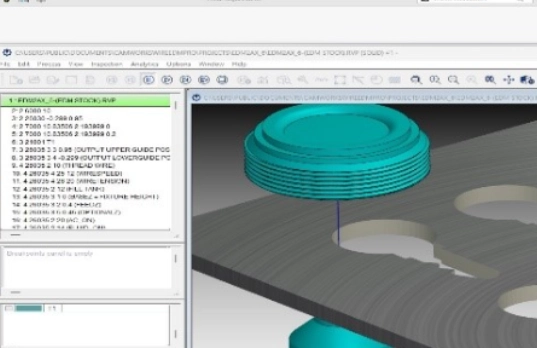
Sim tools are a big deal in today’s EDM setups. They check runs ahead to spot crashes or clamp problems before cutting starts. Layer-by-layer views of wire routes build trust that nothing goes wrong. Spotting errors in the computer cuts waste and scrap big time.
I’ve seen teams catch a fixture clash that would have ruined a $5000 block. Prevention pays off.
What Role Does Automation Play in Wire EDM Software Performance?
Hands-off features change setup from handwork to smart data handling. In busy production or round-the-clock shifts, these bits directly boost output and steadiness.
Automation isn’t perfect, but it handles the boring stuff so people focus on the tough parts.
Intelligent Feature Recognition Systems
Auto-spotting picks out holes, edges, angles, and outlines from loaded designs. Then it picks cut plans by shape—rough or fine passes, corner easing, or light skim cuts. No need for input. This slashes prep time and keeps accuracy the same for batch after batch.
In a prototype run of 100 gears, it might save two hours of clicking. Reliable and quick.
Automated Parameter Optimization
Strong EDM tools have built-in lists of tested settings for stuff like hard metal, light alloys, or tough steels. The program shifts power, spark length, and speed based on thickness and how well the material conducts. So, cuts stay solid, no matter who’s running the shift or their skill level.
For titanium parts, say, it adjusts to avoid wire breaks that plague manual tweaks.
Batch Processing Capabilities
Batch mode runs several tasks in a row with little watching. Queue them for night shifts using schedule tools that sort by deadlines or stock. In big ops making hundreds of like parts each week, this ramps up work without dropping quality.
A factory I recall doubled output overnight with this. Lights out, but machines humming.
Why Is CAD/CAM Integration Critical for Precision Experts?
For pros chasing tiny tolerances, smooth links between drawing and making are a must. CAD/CAM ties keep info steady from idea to final check.
Without it, a small file glitch can throw off a whole series. Integration keeps things on track.
Seamless Data Transfer Between Design and Manufacturing Stages
Tied CAD/CAM setups skip errors from swapping file types like IGES or STEP. Keeping original shapes means sizes, limits, and finishes stay true all through the cuts.
Engineers draw it right, and machinists get it exact. No lost details in between.
Support for Multiple File Formats and Standards
Teams use tools like SolidWorks, CATIA, NX, or AutoCAD. The best wire EDM programming software reads these straight, no conversions that mess up shapes or eat time.
One team saved a day by skipping file fixes. Direct support smooths teamwork.
Real-Time Model Synchronization Features
If a designer changes a curve during a job, the cut side updates paths right away. This stops old plans from hitting the floor. It helps designers and cutters talk better under deadlines.
Picture a last-minute fix on a bracket—sync catches it, no delays.
How Do Simulation and Verification Tools Enhance Accuracy?
Sim work connects plan time to real cutting. It builds sure that the program will work just as thought when the machine fires up.
These tools aren’t foolproof, but they spot most issues early. Worth the extra step.
Virtual Machining Environments
Virtual setups copy real factors like fluid flow, spark space, and heat shifts. Checking these on screen first shows how settings change cut results. You predict issues before using real stuff—a smart way to cut costs at start.
For a thick steel plate, sim might show a heat warp and let you adjust feed by 5%.
Advanced Collision Detection Systems
Crash checks watch every wire move against holds or clamps in full 3D. Spot a close call, like with a tool edge, and it warns with pictures. Fix it quick before real harm.
In tight molds, this has saved more than one setup from scrap metal.
Post-Machining Verification Modules
Once done, check tools match cut parts to original designs using measure links or scan data. Reports show off-spec spots fast. Tweak for next ones right away.
A 0.02mm deviation on a blade? It flags it, and you refine the pass.
What Are the Key Factors in Evaluating Software Reliability and Support?
Steadiness means more than just running without crashes. It covers ongoing fixes and quick help when problems pop up in busy hours.
Good support can turn a bad day around. It’s part of what makes a tool last.
Consistency of Software Updates and Maintenance
Steady updates match new gear like better motors or control updates. Makers who push fixes often show they care about long use, not just a quick sell.
Quarterly patches for a new machine model keep things current without headaches.
Availability of Technical Support Resources
Solid help teams cover areas with chat or far-off checks for rush fixes. Full guides online let you solve alone, saving shop time in crunch times.
A midnight call resolved a glitch in 20 minutes once. That’s gold in production.
Proven Industry Reputation and Certification Standards
Tools with known stamps meet global rules for fields like plane parts or health gear. Good word from EDM pros backs claims with real stories, not just ads.
Certifications like ISO add trust, especially for export jobs.
How Can Scalability Influence Long-Term Investment Value?
Growth potential sets if your tool fits needs years later as work expands or shifts markets.
Starting small but planning big avoids big swaps down the road.
Adaptability to Evolving Production Demands
Growing systems add bits through add-ons, not full overhauls when business picks up—from test runs now to non-stop ops later—all in one setup.
A shop grew from 10 to 50 machines without software pain. Scalable wins.
Integration With Enterprise-Level Systems
Links to big planning or shop tools give clear views across teams—from buying stock to tracking jobs live. Bosses decide quicker with real data from the floor.
ERP tie-ins cut order delays by tracking material in real time.
Cost-Efficiency Through Modular Licensing Models
Piece-by-piece fees mean pay for what you use, with easy adds later sans full costs. It matches spend to returns in smart business ways.
Start basic, add sim for $5k when ready. Flexible and fair.
FAQ
Q1: What makes wire EDM programming software “high-performance”?
A: It mixes tight control with smart hands-off parts that cut handwork while keeping steady cuts in various metals and shapes.
Q2: Why does UI design matter so much?
A: A clear setup cuts learning, stops setup slips, and lets pros speed through repeats without missing key details.
Q3: How does automation improve productivity?
A: Auto-spotting makes cut plans fast from designs, and batch runs handle many at once—saving hours in busy spots.
Q4: Why should CAD/CAM integration be prioritized?
A: Tied systems hold shape truth through all steps, so no file slips hurt final accuracy—vital in high-stakes making.
Q5: What role do simulation tools play before cutting begins?
A: They copy real cuts on screen to find crashes early and check paths—stopping waste when real work starts.